


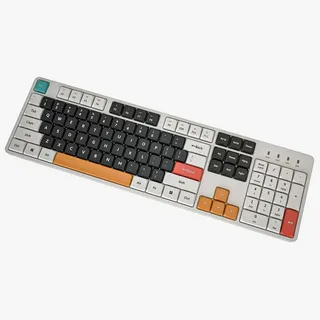
When it comes to creating an efficient and comfortable office setup, one of the most crucial decisions is selecting the right keyboard. Among the many options available, a full size keyboard is often the best choice for those who want a blend of functionality, comfort, and productivity. But how do you choose the perfect full-size keyboard for your office setup? In this article, we’ll guide you through the process of selecting the best one for your needs.
What Is a Full-Size Keyboard?
A full-size keyboard is a standard keyboard that includes all the essential keys: the main alphanumeric keys, a number pad, and function keys. Unlike compact or tenkeyless models, a full-size keyboard is designed to offer a more traditional layout with more space for your hands and wrists.
Key Features of a Full-Size Keyboard
- Full Key Layout: Includes alphanumeric keys, function keys (F1-F12), navigation keys (arrows, home, end), and a dedicated number pad.
- Larger Form Factor: Typically 17-18 inches in width.
- Better for Data Entry: The inclusion of the number pad makes it ideal for tasks involving numbers, such as spreadsheets, accounting, and data entry.
Why Should You Choose a Full-Size Keyboard?
A full-size keyboard offers a range of benefits, particularly for people who spend long hours at their desk. Here are a few reasons why a full-size keyboard might be the right fit for your office setup:
1. Increased Efficiency for Office Tasks
If your work involves frequent typing or data entry, a full-size keyboard can be a game changer. The number pad, for example, is essential for quickly entering numbers and performing calculations, making it a great choice for accountants, analysts, and anyone who regularly works with numbers.
2. Comfort and Ergonomics
A well-designed full-size keyboard typically provides ample space for your hands to rest comfortably. Some models even offer ergonomic features like split keyboard layouts, cushioned wrist rests, or adjustable tilt angles. These features can help reduce strain on your wrists and improve your typing posture, leading to less fatigue during long hours of use.
3. Traditional Layout Familiarity
Many people prefer a full-size keyboard simply because they are accustomed to the traditional layout. The key arrangement is more familiar to those who have used desktop computers for years, which can lead to fewer mistakes and quicker typing speeds.
Factors to Consider When Choosing the Perfect Full-Size Keyboard
Now that you understand the benefits of a full-size keyboard, let’s dive into the key factors you should consider before making your purchase.
1. Typing Feel and Switch Type
When selecting a full-size keyboard, the type of switches it uses is one of the most important factors. There are a few common types of switches to choose from:
- Mechanical Switches: Known for their durability and tactile feedback, these are ideal for people who type a lot or need a high level of precision.
- Membrane Switches: These are quieter and less expensive than mechanical switches but tend to feel softer and less responsive.
- Hybrid Switches: A mix of mechanical and membrane, these switches offer a balance of performance and affordability.
2. Connectivity Options
Consider how the keyboard connects to your computer. The two most common options are:
- Wired Keyboards: Typically more reliable and faster in terms of response time, though they limit mobility due to cables.
- Wireless Keyboards: Provide greater flexibility and reduce cable clutter, but may have occasional latency or require battery replacements.
3. Key Travel and Actuation Force
Key travel refers to the distance the key travels when pressed, while actuation force is the amount of pressure needed to register a keystroke. Different people have different preferences when it comes to these factors, so you should look for a keyboard that feels comfortable to your typing style. If possible, try out a few keyboards in-store to see what works best for you.
4. Additional Features and Customization
Some full-size keyboards come with added features that can enhance your productivity, including:
- Programmable Keys: These allow you to assign custom commands or shortcuts, which can save you time if you use specific software frequently.
- Backlighting: Adjustable RGB or white backlighting can be useful in low-light environments and can add a personalized touch to your office setup.
- Media Controls: Extra buttons for volume, play/pause, and other media functions can make it easier to manage your audio and video without switching to another window.
Conclusion: Choosing the Perfect Full-Size Keyboard for Your Office Setup
When it comes to choosing the perfect full-size keyboard for your office setup, it’s important to keep in mind factors such as typing feel, connectivity, and additional features. Whether you prioritize comfort, speed, or customization, there’s a keyboard out there that suits your needs. By considering these aspects and testing out different models, you can ensure that your keyboard enhances both your productivity and comfort, helping you work more efficiently in your office environment.
